Client app
An app your clients
actually open
Fullscreen workouts with your technique videos, logging in two taps, progress they can watch grow — and you in the chat, one tap away.
Free for your clients, always. Free for you too, for life, if you’re one of our first 100 coaches.
Why an app
A PDF plan doesn't train anybody
So your clients get a real app — where the plan plays like a story, results take two taps, and every question lands next to the exercise it's about.
Coaching over documents and chats
- The plan lives in a PDF the client scrolls once and loses
- Results come back as voice notes — if they come back at all
- Technique questions get buried in a messenger scroll
- You can't see who's actually training this week
One app: your videos, logged results, visible progress — and every conversation in context.
Home & schedule
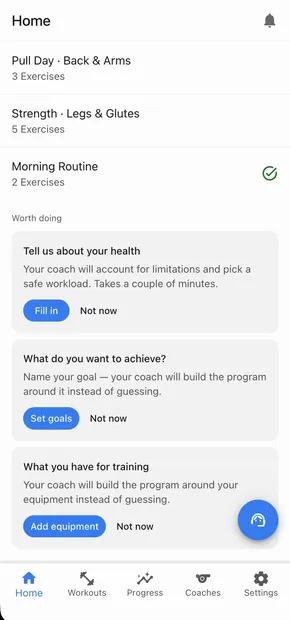
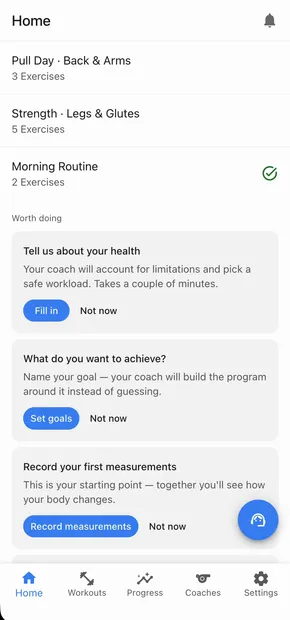
The whole plan lives on one screen
The home screen answers the only question that matters at 7 a.m.: what's today? Today's workout sits on top, one tap from starting.
The workouts tab is a real calendar — past sessions with their checkmarks, the week ahead already planned. Your client sees the rhythm you built for them, not a wall of documents.
Guided cards nudge new clients through setup — goals, health notes, available equipment — so you get context without interrogating anyone in chat.
Doing the workout
Training feels like a story, not a spreadsheet
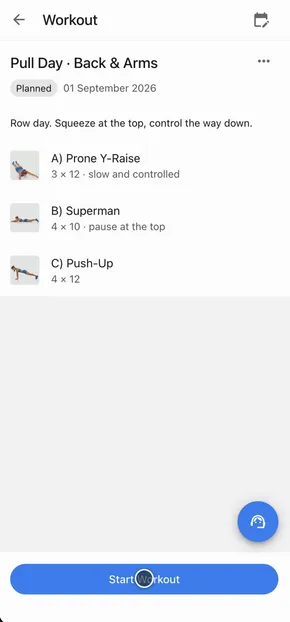
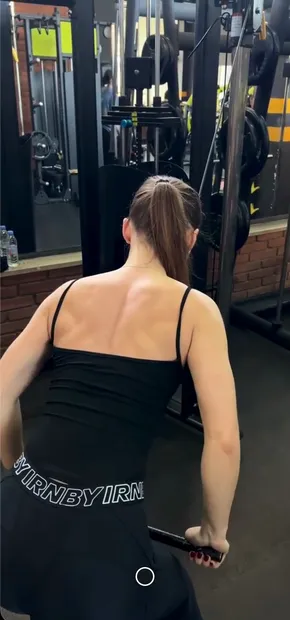
One exercise fills the whole screen, your technique video playing behind it; swipe up for the next. The interface fades while the set is on, so nothing distracts — a tap brings it back.
Logging is two taps: big steppers with last time's numbers pre-filled, a quick how-did-it-feel rating, save. Sweaty-hands friendly by design.
Done advances to the next movement automatically. Paired exercises run round by round, rest days are part of the plan, and the start screen fills with checkmarks as your client moves.
On every card
One card is the whole gym kit
Everything a set needs is on the card. A private note per movement — “grip felt strong” — waiting for them next time. A rest timer with countdown and stopwatch, right where the rest happens. The screen never sleeps mid-set.
Form check without leaving the workout: your client films it on the spot and sends it from the card. It lands in that exercise's chat — and your answer stays pinned to the movement forever.
Every logged result posts a card into the same thread, so the conversation about an exercise carries its history with it.
Coach chat
You're one tap away — and it shows
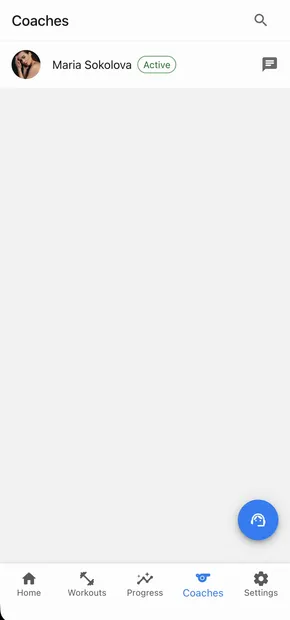
The chat lives where the training lives. Send text or video — a deadlift breakdown filmed on your phone plays right in the thread.
Every message reaches them as a push notification, replies take seconds, and encouragement arrives exactly when the log shows it's earned: “+2.5 kg and it still looked easy”. One broadcast reaches your whole roster the same way.
No messenger roulette, no “which app did we use?”. One thread, full context, on both of your screens.
Progress & measurements
Numbers that keep clients paying attention
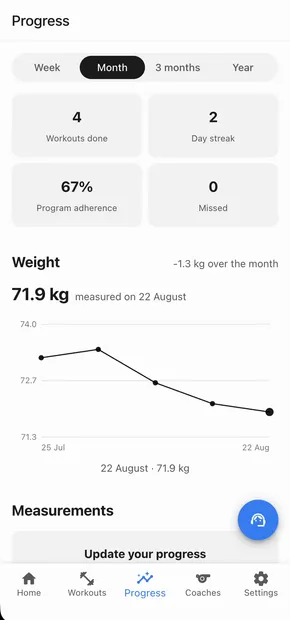
Weight trend over the month, workouts done, day streak, and the share of planned sessions they actually completed — the progress screen turns training into a scoreboard your client wants to check.
Personal records and current working weights sit right there too, so “am I actually getting stronger?” has an answer on screen.
Body measurements take a couple of taps to log and show up as deltas — waist down, chest up — with front-and-back photos side by side for the before/after that sells the next block.
Every number lands on the client's card in your coach dashboard too, so you're never the last to know.
Built-in AI assistant
“How do I…?” — answered without you
Every client gets an AI assistant inside the app — and most of what they ask it is not coaching, it's software. “Where do I log my weight?”, “how do I send you a video?”, “what's my workout today?”
It answers from their own schedule and the built-in guides, so the how-do-I questions never reach you. It can't change your programming and it doesn't play coach: training decisions stay yours.
That's the difference between a client who quietly gives up on the app and one who just gets on with the workout.
And around it
The details that keep clients coming back
Reminders at the hour they choose
Workout-day reminders land at the time each client picks, in their own timezone — plus your chat replies and access-expiry warnings. Push and email, and an in-app notification centre with an unread badge.
Their calendar, synced
Clients connect their own Google Calendar in two taps, and every workout you plan shows up on their schedule — your plan lives where their day is planned.
No passwords, no friction
Clients sign in with a one-time code from their email. One link from you is the whole onboarding — no account ceremony to abandon.
Their history, before every set
Each exercise carries its own history: what they lifted last time, personal records and current working weights — so progression is a fact on screen, not a memory.
Goals, health notes and equipment
Clients log their goals, injuries and what gear they actually have — and you get a notification instead of digging it out of chat. Built-in guides answer their “how do I…” questions so you don't have to.
Not just sets and reps
Cardio and timed work log time and distance instead of weight, and every set can carry a quick rating with the reason it felt hard — numbers plus context.
Life happens — they reschedule
A client can move a session to another day themselves instead of silently skipping it. You see the new date, not a gap in the log.
Access that ends on time
Paid access has a date, and both of you get a heads-up before it runs out — the renewal conversation starts on time instead of a month late.
Stores and browser alike
iOS and Android apps, plus the full experience in any modern browser. Start on the web today, install whenever — same account, same data.
Everything they log, your AI can read
Results, measurements, goals, form answers — connect your account to Claude or ChatGPT and “summarize Anna's month” becomes a one-line request in the AI you already use.
One link is the whole onboarding
Send an invite, and your client signs in with a code — no passwords. They can train in the browser immediately and install the app from the stores whenever they like.
App Store & Google PlayQuestions coaches ask
Do my clients pay for the app?
Never. Clients install and use the app for free. You're free too: our first 100 coaches get the whole platform free for life; after that it’s free for 3 clients, then a flat $49/month.
Do clients have to install anything?
Only if they want to. The app is on the App Store and Google Play, but it also runs fully in the browser — one link from you and they're training.
What do clients see — me or the platform?
Your coaching, front and center: your name and photo, your programs, your technique videos, your messages. The app is the stage; you're the show.
How do their results reach me?
Instantly. Completed workouts, logged sets, ratings, measurements, goals and form videos appear on the client's card in your coach dashboard, with notifications for the moments that matter. One exception by design: a client's private notes to self stay private.
What keeps clients engaged between sessions?
The plan is always in their pocket, a workout-day reminder lands at the hour they picked, progress charts and records show the payoff, the built-in AI assistant answers the small questions — and your chat is one tap away for everything else.
Can clients ask about a specific exercise?
Yes — every exercise has its own chat thread. Questions, form videos and logged results all land there, so feedback stays attached to the movement instead of drowning in a general chat.
Your next client's first workout could feel like this.
Build the program, send one link — and watch the checkmarks come in.
Start free