Exercise library
Film it once.
Coach with it forever.
Your own video library of your own technique — organized with folders and search, streamed to every client's phone, and reused in every program you'll ever build.
Included on every plan · Free for life for our first 100 coaches
Why your own library
A thousand stock clips can't teach your squat
So we made the library yours. Film a movement once, and it teaches every client you'll ever train.
Stock exercise libraries
- Anonymous models demonstrating generic form
- Cues and standards that aren't yours
- Clients learning technique from a stranger
Your library: your cues, your standards, your voice — attached to every program you build.
The library
A video grid that stays findable at any size
Every exercise is a card with your clip, auto-generated thumbnail and duration. Search narrows the grid as you type, folders keep the collection tidy, and opening a card gives you the video with its instructions — ready to edit in place.
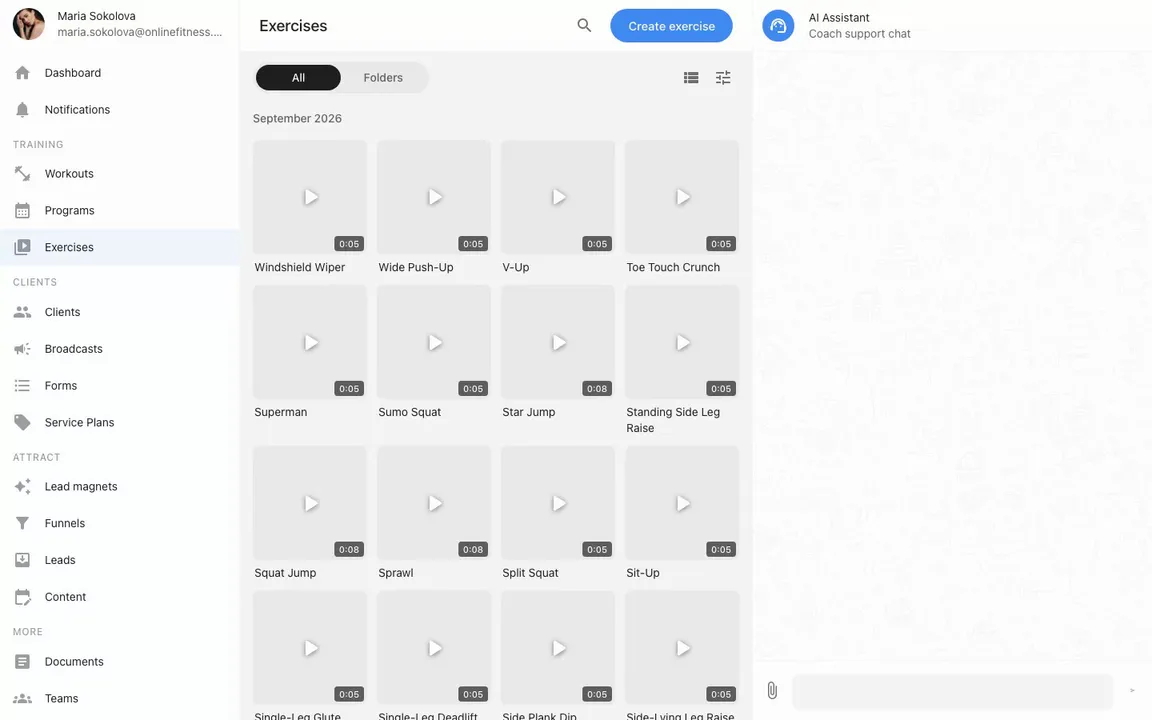
Recorded in the real product — browsing, searching, opening a card, and filing the library into folders.
Built for reuse
An asset you build once — not admin you redo weekly
Video-first cards
Upload a clip and we handle the rest — processing, streaming, and a thumbnail for every card. Your technique plays crisply on any device, from the cabinet to the client's phone.
Folders that don't bite
Group movements the way you coach — mobility, lower body, rehab. Deleting a folder never deletes exercises; they just step out of it.
Found in a keystroke
Search by name, filter by type — strength, cardio, flexibility, timed — and sort by date or alphabet. A library of hundreds stays a two-second lookup.
Copies are snapshots
Adding a library exercise to a workout copies it. Edit or reorganize the library any time — programs already assigned to clients keep exactly what you sent them.
One library feeds everything
The program builder and client calendars autocomplete from the same library — pick a name and the video, instructions and settings come along.
Questions land on the exercise
Clients can ask about a movement right under the exercise — one thread per movement, shared across every workout it appears in. Context stays where the technique is.
Prefer to delegate?
The library works even when you don't touch it
Both AI layers of the platform build from this same library — so every clip you film multiplies.
Ask the AI assistant
Ask for a workout or a whole plan in your cabinet chat — the assistant pulls exercises from this library with videos attached, and can tidy up card details for you along the way.
Meet the AI assistantBring your own AI via MCP
Connect ChatGPT or Claude to your account and it can create exercises, file them into folders, and batch-add them to programs and workouts — straight from your own chat.
See how MCP worksThe library is where every program starts
Type a name in the workout builder and the library completes it — video attached. Assign the program, and your clips play inside each client's workout, with your instructions beside them.
Questions coaches ask
Do I have to film my whole library before I start?
No. Most coaches start with the handful of movements their current programs actually use and add clips week by week. An exercise without a video still works — the video just makes it teach itself.
Where are the videos hosted?
With us. You upload the file, we process it into streaming quality, generate the thumbnail, and serve it to your clients' apps — no separate video hosting, no links to manage.
What happens to assigned workouts when I edit an exercise?
Nothing — and that's deliberate. Workouts and programs get snapshot copies of the exercise at the moment you add it, so clients keep exactly the version you sent. The library edit applies to everything you build afterwards.
How do clients see my videos?
Inside their workout: each exercise card plays your clip next to the sets, reps and your instructions. If something's unclear, they ask right under the exercise and you answer in the same thread.
How do exercises get into programs and workouts?
Start typing in the program builder or a client's calendar and the library autocompletes — video, instructions and settings attach automatically. Your AI assistant and MCP tools pull from the same library too.
What does it cost?
The library, video processing and streaming are included on every plan. Our first 100 coaches get the whole platform free for life; after that it’s free for 3 clients, then a flat $49/month.
Your technique deserves a longer life than one training session.
Film five movements tonight, drop them into a program tomorrow — and never explain a squat from scratch again.
Start free