

What changes when you can’t watch the client train
In the gym, half of the program never gets written down. You show the movement, pick the weight, fix the knee on the second rep and shorten the workout when the client looks tired. Online, nobody is there to do that. The client reads your plan alone, on their phone, between sets, with the equipment they have at home or in their gym.
So an online program is more than a list of exercises. Each thing you would say in person needs a written replacement, prepared in advance.
| In the gym you would | Online, the program gives |
|---|---|
| Show the movement | A video of the exercise and a few written cues: start position, the movement, what to watch for |
| Pick the weight | A light start, an effort target for every set and the client’s numbers from last time |
| Correct technique on the spot | The client’s videos and your reply |
| See that the client is tired | A rating from the client after every exercise |
| Use the gym’s equipment | Exercises chosen from the equipment the client actually has |
| Notice a no-show | Missed workouts visible to you, and an agreement on what happens next |
Show the movement
- Online, the program gives:
- A video of the exercise and a few written cues: start position, the movement, what to watch for
Pick the weight
- Online, the program gives:
- A light start, an effort target for every set and the client’s numbers from last time
Correct technique on the spot
- Online, the program gives:
- The client’s videos and your reply
See that the client is tired
- Online, the program gives:
- A rating from the client after every exercise
Use the gym’s equipment
- Online, the program gives:
- Exercises chosen from the equipment the client actually has
Notice a no-show
- Online, the program gives:
- Missed workouts visible to you, and an agreement on what happens next
What to find out before you write the first program
The first step is taking the client’s history. I find out in detail what their goals are, what they have done before, what was hard and what did not work. I always ask about contraindications, past illnesses and injuries, and about how they live right now: how much they sleep, how much stress they have, what their job is. All of this goes into the program, because the right load differs from person to person. Not everyone needs a workout of an hour or more. It depends on what the client wants, what shape they are in now and how they live.
I also collect photos and assess posture. Going deeper, I look at how the two sides compare, the shoulder blades, the pelvis, and where the head sits relative to the chest. That goes into the program as well: I choose the exercises based on what I see.
Screen for what needs a doctor before training. A short questionnaire such as the PAR-Q+ covers the basics. Ask the client to see a doctor first if they have chest pain or dizziness on effort, heart disease, high blood pressure that is not under control, recent surgery, are pregnant, or have pain that nobody has checked.
Most of these questions belong in the intake form. We read 70 real forms in our study of what coaches ask in client intake forms, and the photo setup is in our guide to client progress photos.
Add one question that matters more online than in the gym: what equipment does the client have, and where will they train? In OnlineFitness.app, the app this site belongs to, the client keeps their own list of equipment, and the coach sees it under Equipment in the client’s menu.
How to structure an online training program
When I build a program, I work with two principles: cycles and load. We work on every part of fitness. With a beginner, we first work on basic strength, muscle tone, symmetry and the deep muscles of the spine. Next we work on endurance and add coordination and balance. Later we come back to balance and add unilateral work, each side on its own, to even out the strength. Only then do we start hypertrophy cycles, for building muscle.
Each cycle has its own goal, and a cycle can last two to three, maybe even four months. How varied the program is, and how often we change the exercises, depends on that goal. If we are working on hypertrophy, there is no point in changing the exercises often, because the person progresses within the cycle. If we are working with a beginner who needs to develop all their movement skills, the program is more varied, with more lead-up and functional exercises. That way they learn to feel their whole body and understand the technique, which the harder exercises are built on later.
Lead-up exercises are simpler drills that build up to a harder movement. Many coaches train strength, muscle and balance together from the start, and clients improve in all three from the first weeks. Whichever order you choose, give each cycle one clear goal and tell the client what it is.
Inside a cycle, write the program in blocks of a few weeks. Plan the number of workouts for a bad week, not a good one: two or three workouts the client does every week beat five they keep missing. Give each workout a short note on what equipment it needs and how to warm up.
| Workout | Exercise | The line the client sees |
|---|---|---|
| Day 1 · Lower Body A | Split squat | 3 × 10 each leg · rest 90 sec · 2 reps in reserve |
| Day 1 · Lower Body A | Single-leg deadlift | 3 × 8 each leg · rest 60 sec · light, hold a chair |
| Day 1 · Lower Body A | Glute bridge | 3 × 15 · 2 sec pause at the top |
| Day 3 · Upper Body | Kneeling push-up | 3 × 10 · rest 60 sec · 2 reps in reserve |
| Day 3 · Upper Body | Prone Y-raise | 3 × 12 · slow, 2 sec at the top |
| Day 3 · Upper Body | Plank shoulder tap | 3 × 20 taps · hips still |
| Day 5 · Lower Body B | Reverse lunge | 3 × 8 each leg · rest 90 sec · 2 reps in reserve |
| Day 5 · Lower Body B | Sumo squat | 3 × 12 · rest 60 sec |
| Day 5 · Lower Body B | Single-leg glute bridge | 3 × 10 each leg |
Day 1 · Lower Body A
- Exercise:
- Split squat
- The line the client sees:
- 3 × 10 each leg · rest 90 sec · 2 reps in reserve
Day 1 · Lower Body A
- Exercise:
- Single-leg deadlift
- The line the client sees:
- 3 × 8 each leg · rest 60 sec · light, hold a chair
Day 1 · Lower Body A
- Exercise:
- Glute bridge
- The line the client sees:
- 3 × 15 · 2 sec pause at the top
Day 3 · Upper Body
- Exercise:
- Kneeling push-up
- The line the client sees:
- 3 × 10 · rest 60 sec · 2 reps in reserve
Day 3 · Upper Body
- Exercise:
- Prone Y-raise
- The line the client sees:
- 3 × 12 · slow, 2 sec at the top
Day 3 · Upper Body
- Exercise:
- Plank shoulder tap
- The line the client sees:
- 3 × 20 taps · hips still
Day 5 · Lower Body B
- Exercise:
- Reverse lunge
- The line the client sees:
- 3 × 8 each leg · rest 90 sec · 2 reps in reserve
Day 5 · Lower Body B
- Exercise:
- Sumo squat
- The line the client sees:
- 3 × 12 · rest 60 sec
Day 5 · Lower Body B
- Exercise:
- Single-leg glute bridge
- The line the client sees:
- 3 × 10 each leg
Each workout also carries its note: “Warm up with two light sets of the first exercise” on Lower Body A. The same three workouts repeat for the rest of the block, with the load going up. In OnlineFitness.app a program template covers four weeks, so each template is one block. This example is the demo program in the screens below, which show a demo coach and a demo client.
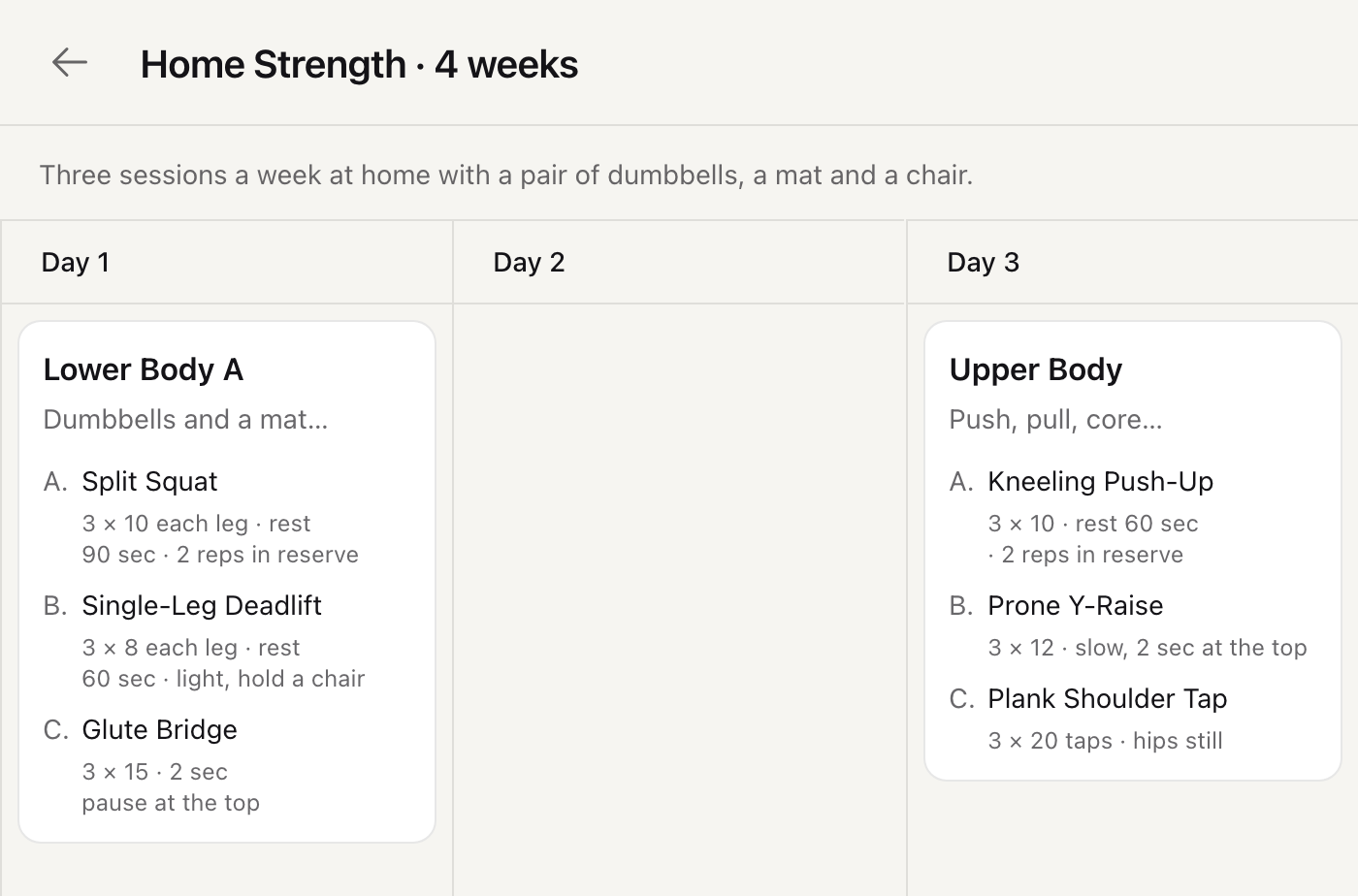
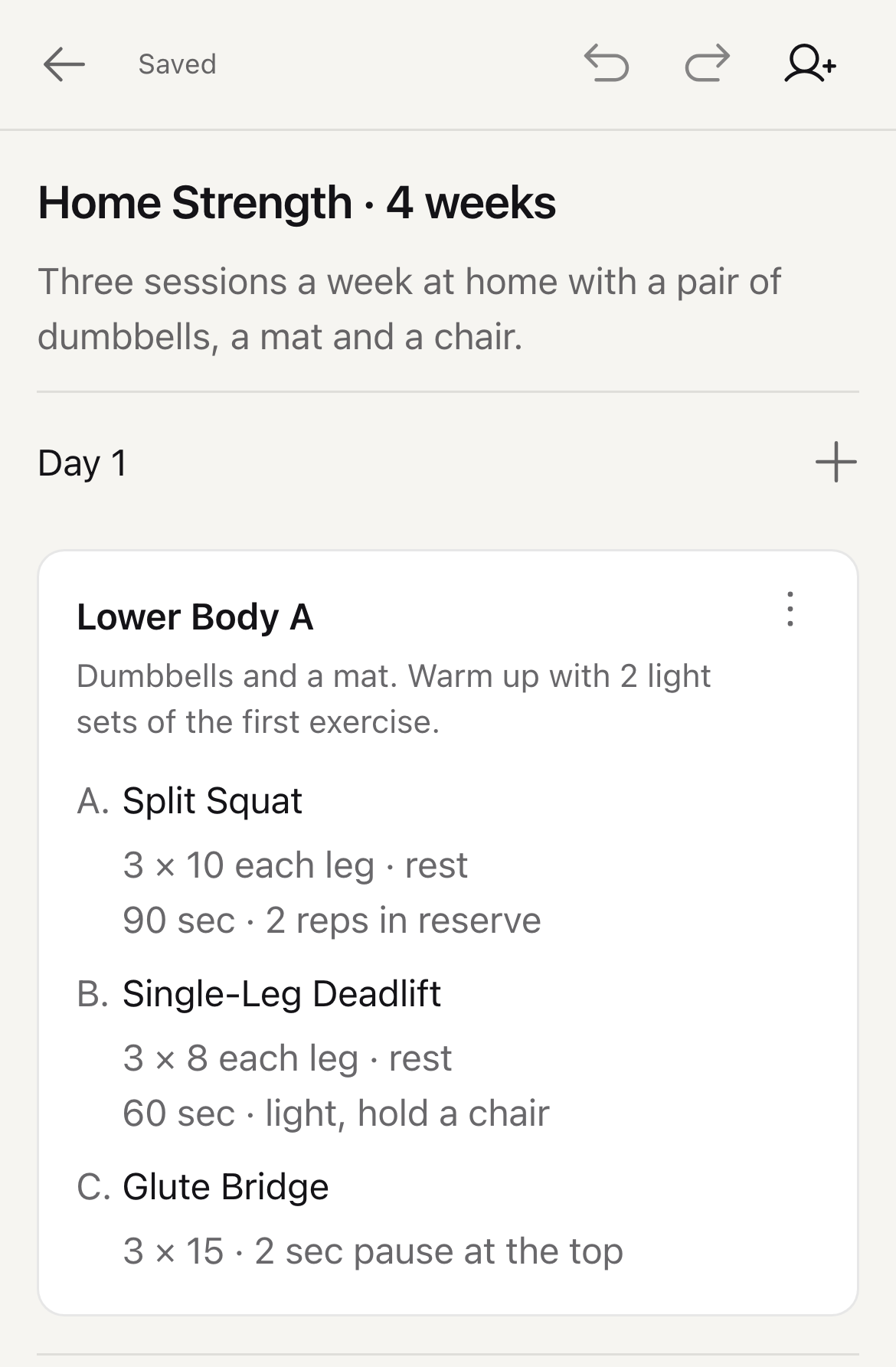
A program template in the coach’s view
- 1 The program’s days, four weeks in all. When you assign the program to a client, day 1 becomes the start date you choose, and the workouts are copied into the client’s calendar.
- 2 A workout with a short note: what equipment it needs and how to warm up.
- 3 The line the client sees under each exercise: sets, reps, rest and how hard it should feel.
What to write for each exercise
An exercise in an online program has three parts. Together they should let the client do it right without you.
- One line under the name. Sets × reps, rest, and how hard: “3 × 10 each leg · rest 90 sec · 2 reps in reserve”. This is what the client glances at between sets, so keep it to one line.
- How to do it. Start position, the movement, and one or two things to watch for. Write the mistake you expect from this client, not every possible one.
- A video. One clean rep or a short set, filmed from the angle that shows the movement best. The handbook chapter on filming your exercise library covers how to film them once and reuse them.

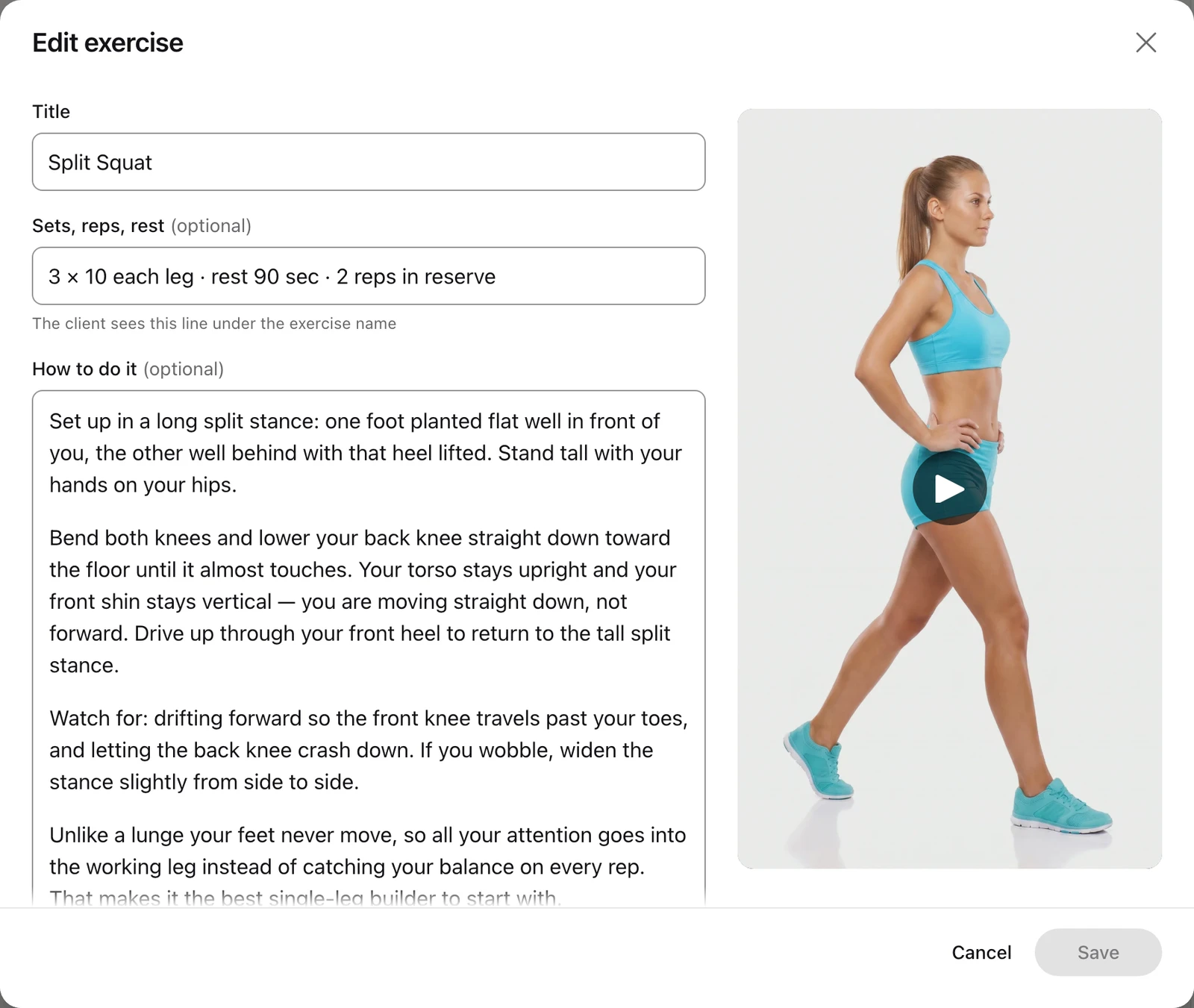
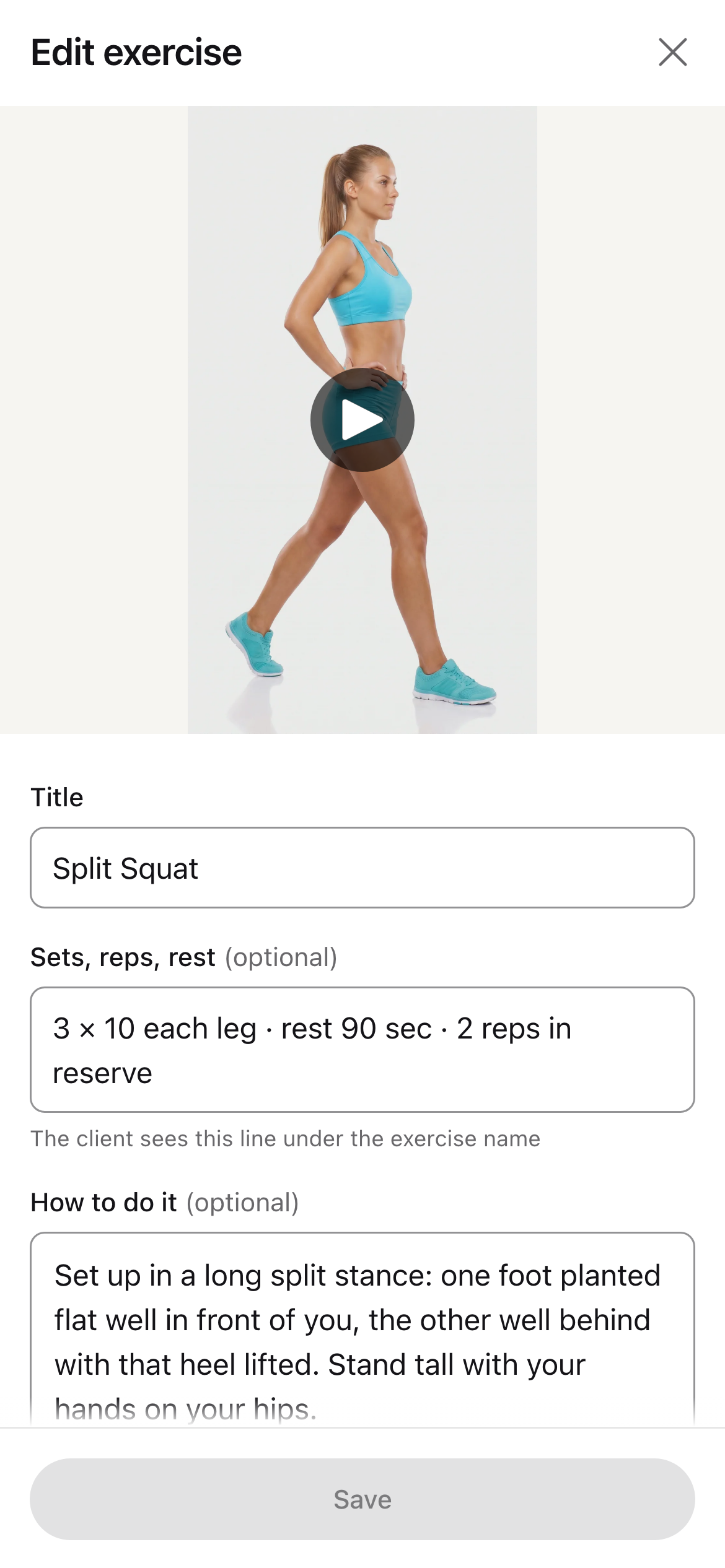
One exercise of the program, as the coach edits it
- 1 Sets, reps, rest. The client sees this line under the exercise name during the workout.
- 2 How to do it. The client opens this text by tapping the exercise name.
- 3 The video comes from the coach’s exercise library, along with the exercise.
How to tell online clients what weight to use
With a beginner, and in fact with everyone, we always start with light weights and watch how the person responds to the load. We do not need heavy weights straight away: technique comes first. With someone who is not a beginner we also start with moderate weights, then increase them gradually and watch whether the technique breaks down and how the person copes. What matters is that the person feels the load but still has a few reps in reserve. That is how we work out the weights they need.
Put that target into the line under the exercise, “2 reps in reserve”, and explain it once in plain words: pick a weight you could lift two more times with good form at the end of the set. Beginners often misjudge this by several reps, so give them 3–4 in reserve at first and check against their videos. Tell the client the first workout is for finding the weight, and that changing it between sets is fine.
Then give a simple rule for going up. One that is easy to write down: a range of reps, say 8–12. When the client reaches the top of the range in every set with good form, they add weight and start again at the bottom. With home dumbbells the next pair can be a fifth heavier, so add reps or a set first.
In OnlineFitness.app, when the client logs a result, the app shows their last set of this exercise from the previous workout and fills in that weight and those reps as the first set.
How to check technique when you can’t see the client
Every week I check four things with each client: technique in the exercises, how they feel, how their muscles are recovering, and whether the planned workouts got done.
I ask clients to film all their exercises, especially the ones they are unsure about, and the ones where they feel some discomfort. Discomfort can mean different things. If it is just a limited range of motion or the movement is hard to do, that is normal. If the person feels a shooting pain, or it hurts, or they cannot do the exercise with decent technique, I usually ask them to skip that exercise. Then we either go through it together, or I watch the video of the first attempt that went wrong. I work out what the problem is and usually replace the exercise with an easier version or with lead-up exercises for that technique.
I am most interested in the main lifts we will load more heavily later: strength work such as glute exercises, Romanian deadlifts and rows. That is for a slightly more advanced level, though. At the first stage I simply review the technique of every exercise.
If a client does not film, that is a problem, because it is hard to judge their real progress. In that case it is better to have video calls, at least once or twice a month, or test sessions the coach watches live, to see the client’s progress, give feedback and keep explaining why filming matters.
Videos are not only for the coach to build, adjust and later periodize the program. They are good practice for the client too, because our body awareness often lets us down. A person may think they move or stand a certain way, but from the outside it looks quite different. They need to develop body awareness and learn to hold their body in the right position.
Pain is different from discomfort. Stop the exercise and send the client to a doctor or a physiotherapist before the next workout if they report sharp or shooting pain that stays, numbness or tingling, pain spreading down an arm or a leg, swelling, or chest pain, dizziness or unusual breathlessness.
Tell the client how to film: set the phone up before the set, on the floor or a shelf, with the whole body in the frame. Film squats, hinges and lunges from the side, and squats and lunges also from the front, where a knee caving in shows. Film a whole set rather than one rep.
In OnlineFitness.app the client sends photos or videos of their technique from the workout itself, with a comment. They arrive in the chat of that exercise, next to the results the client logged for it, and you get a notification.
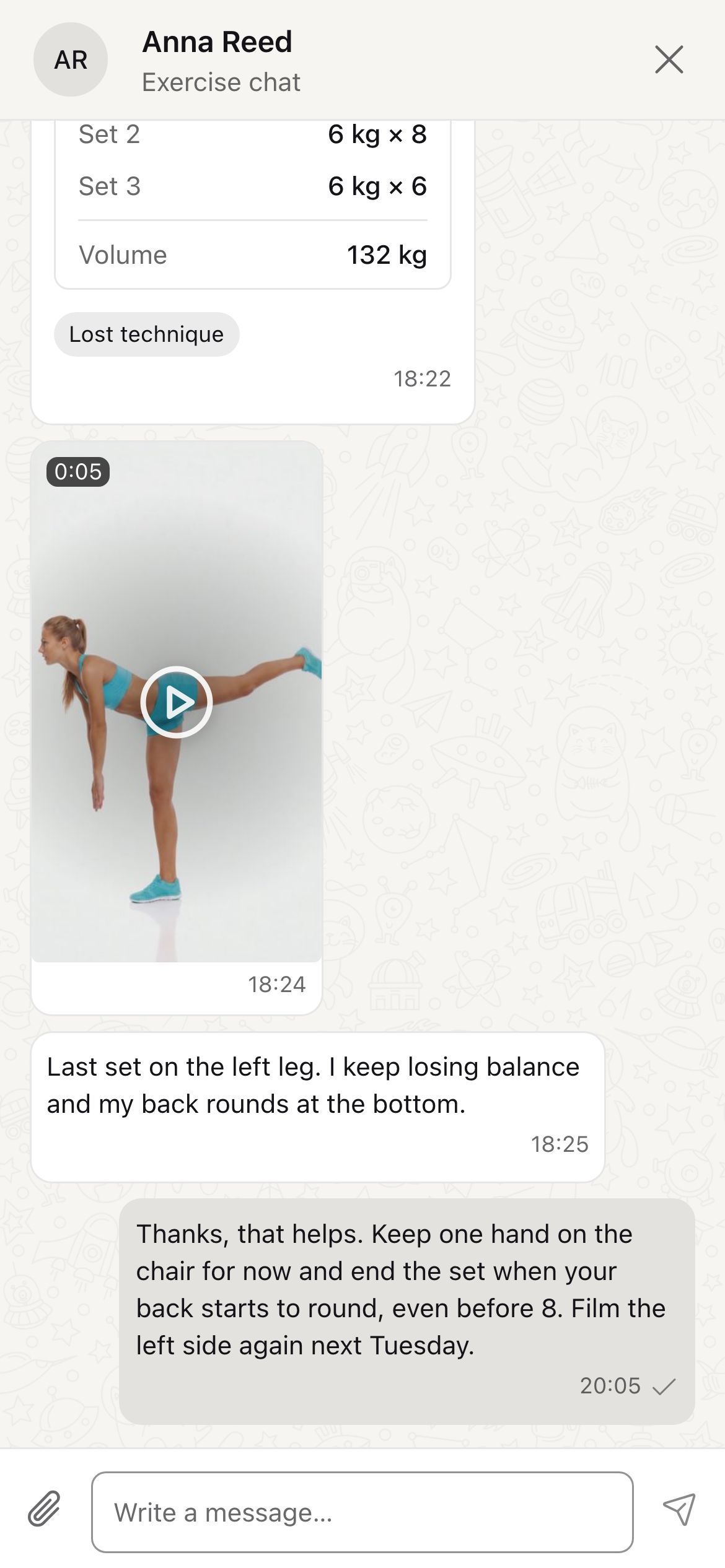
The chat of one exercise, on the coach’s phone
- 1 The result the client logged, with the problem she marked: Lost technique.
- 2 Her technique video, sent from the workout.
- 3 Her comment on what went wrong.
- 4 The coach’s reply.
Ask how every exercise felt
In the gym you see a hard set. Online you need the client to tell you, and the easiest moment is right after the exercise, when they log it. A question after the whole workout gets one word about the whole hour. A rating per exercise tells you which exercise was too easy and where the technique broke down. It is also how you check the client’s reps in reserve: a set meant to leave two reps should not feel Too easy or Hard.
In OnlineFitness.app the client logs each exercise during the workout: the weight and reps of every set, then “How did it feel?” with five answers from Too easy to Couldn’t do it. After the rating the client can add what was behind it, like Can increase weight or Lost technique. The rating is optional, so ask for it at the start and explain that it sets the weights for the next workout.
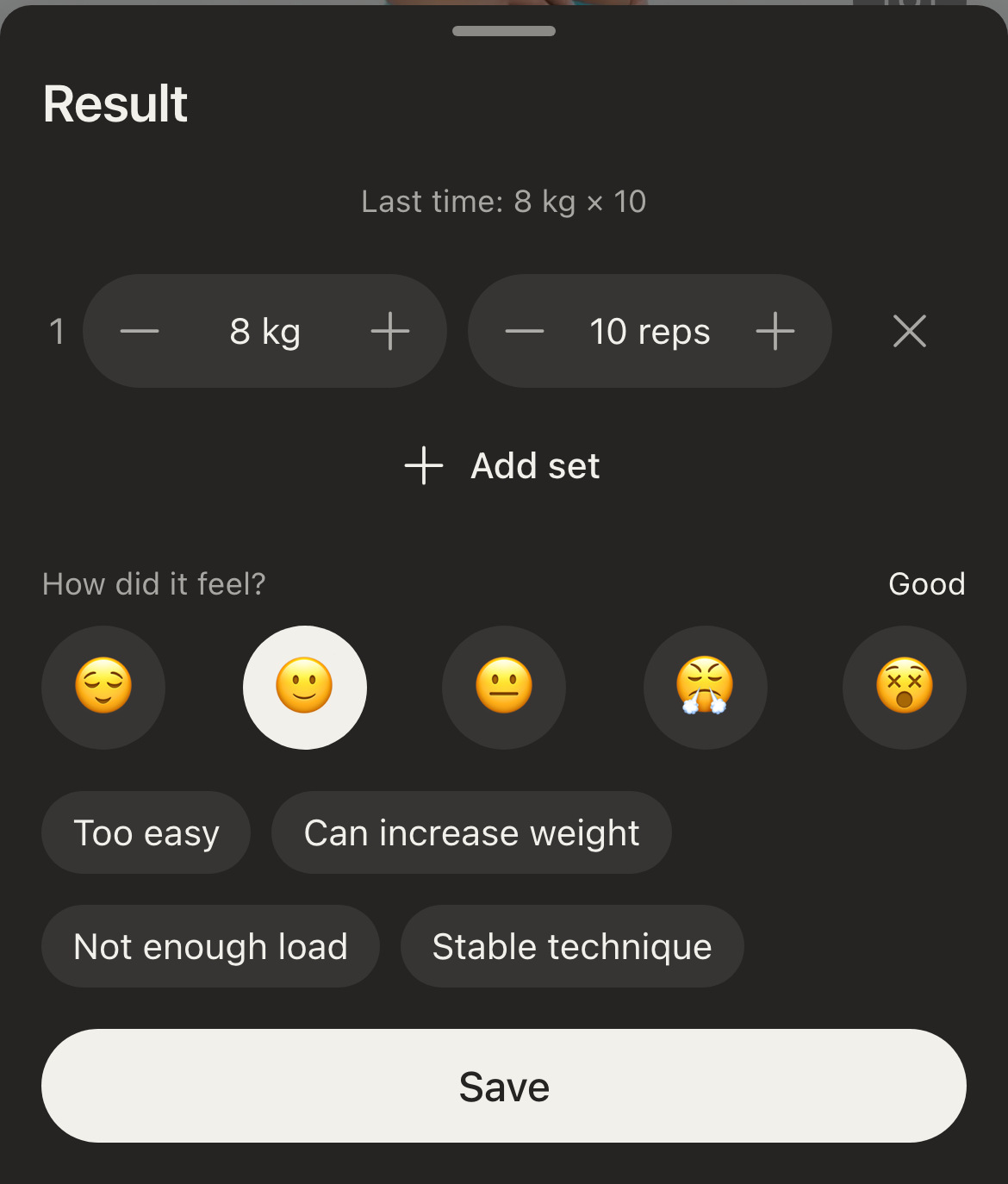
Logging a result in the client’s app
- 1 What the client lifted last time on this exercise.
- 2 One set, filled in from last time. The client adds more as they go.
- 3 How did it feel? Five answers, from Too easy to Couldn’t do it.
- 4 What was behind the answer: what is left in reserve after Too easy or Good, what went wrong after Hard or Couldn’t do it.
Decide in advance what each answer means for the next workout:
| The client says | Next time |
|---|---|
| Too easy, or Can increase weight, two workouts in a row | Add reps or a little weight, as long as the technique holds |
| Good or OK | Keep the weight and work towards the top of the rep range |
| Hard once | Keep everything the same and see how the next workout goes |
| Hard with Lost technique | Lower the weight and ask for a video of the exercise |
| Couldn’t do it, without pain | Lower the weight or switch to an easier version of the exercise |
| Lower back pain, or pain mentioned in the comment | Skip the exercise, look at the video, then swap it for an easier version or a lead-up exercise. If the pain comes back or persists, send the client to a doctor or a physiotherapist |
Too easy, or Can increase weight, two workouts in a row
- Next time:
- Add reps or a little weight, as long as the technique holds
Good or OK
- Next time:
- Keep the weight and work towards the top of the rep range
Hard once
- Next time:
- Keep everything the same and see how the next workout goes
Hard with Lost technique
- Next time:
- Lower the weight and ask for a video of the exercise
Couldn’t do it, without pain
- Next time:
- Lower the weight or switch to an easier version of the exercise
Lower back pain, or pain mentioned in the comment
- Next time:
- Skip the exercise, look at the video, then swap it for an easier version or a lead-up exercise. If the pain comes back or persists, send the client to a doctor or a physiotherapist
How to read the ratings together with the other signals is in our guide to tracking client progress.
What to do with missed workouts
When a client misses a workout or a whole week, I ask them to always tell me: “I can’t make it, because…”, or why they skipped the workout. I always write and ask.
If the person missed a whole week, I take it into account in the plan: I lower the load a little for the next week, or keep it at the same level. If the person was ill, the load can come down a little. If they were away on holiday, we carry on from their working weights and ease back in a little, and of course I find out why they missed.
If someone went away, I always suggest that next time they warn me in advance if they can. Then, instead of a break, we make a program for that week, for example with bands or bodyweight, so they keep the results they have built. People usually like this.
Clients notice whether a coach does this. In a study of 171 client reviews, a plan that moved with travel and bad weeks was almost always praised.
After a fever or a chest infection, wait until the client has had no symptoms for a few days and bring the load back gradually. If breathlessness or a racing heart stays, they should see a doctor before training again.
In OnlineFitness.app, when the day passes and the client has not finished its workout, the workout is marked as missed in the client’s calendar. You can move, copy or change any of their workouts, for example to swap in a week of bodyweight workouts during a trip. The handbook chapter on pauses and comebacks covers longer breaks.
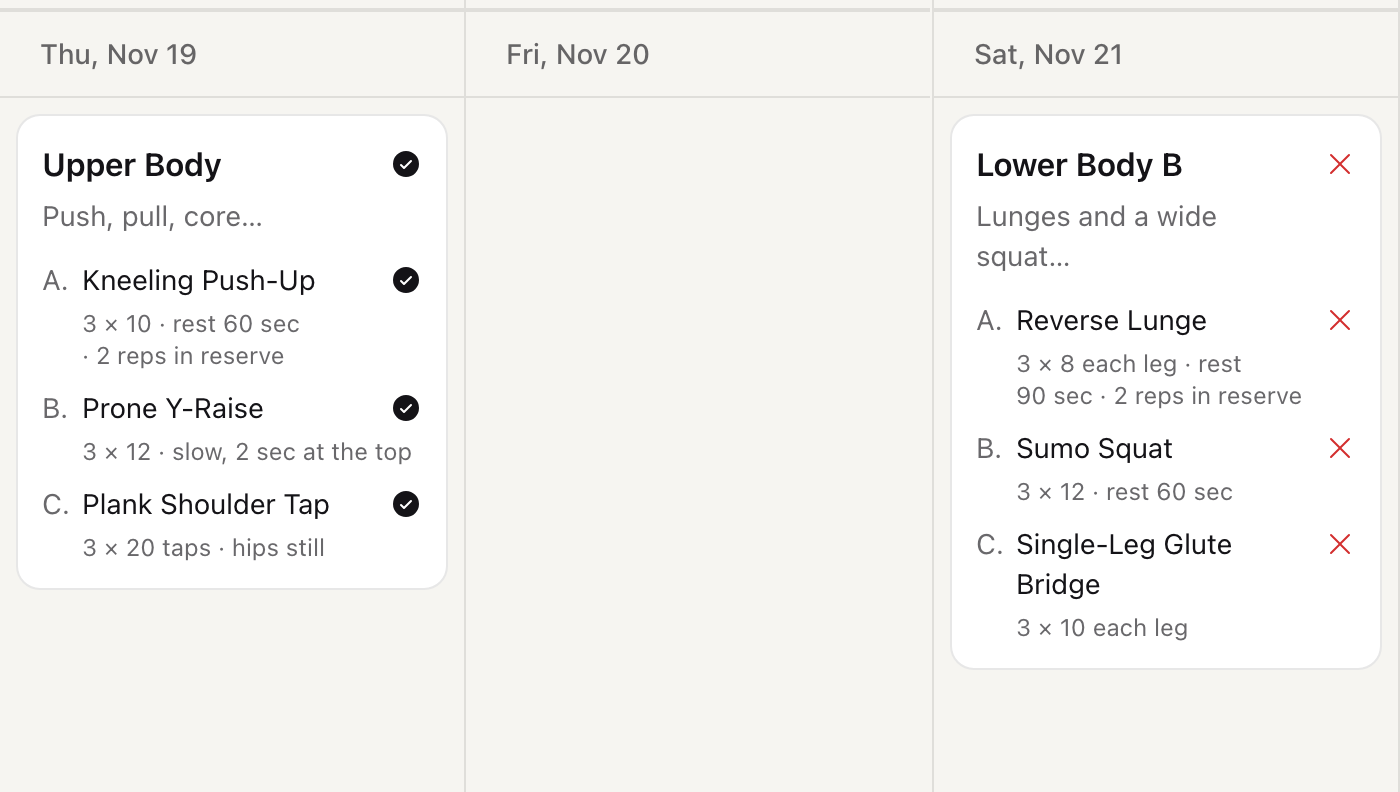
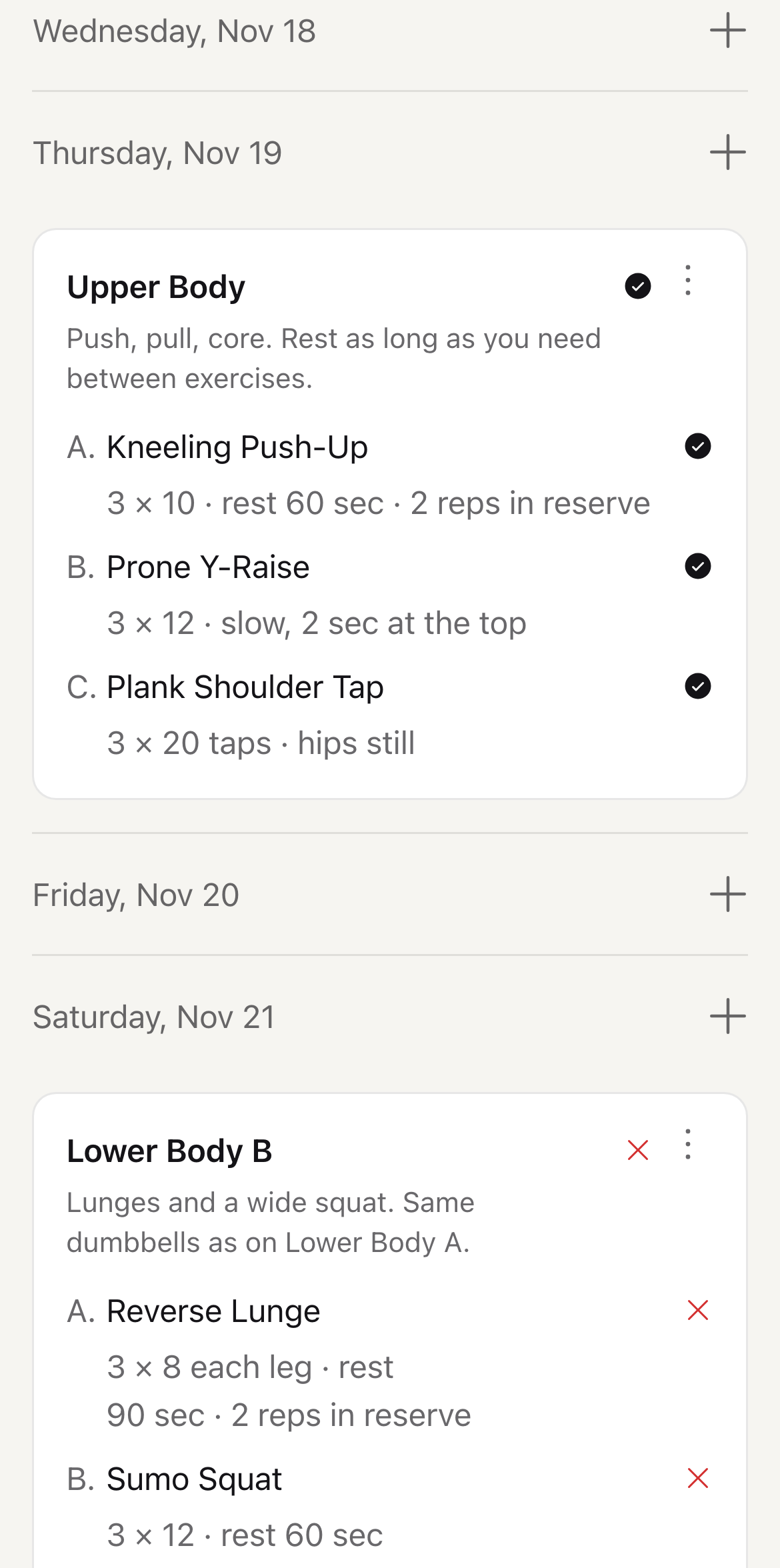
The client’s calendar, as the coach sees it
- 1 A workout the client finished, with every exercise ticked.
- 2 A missed workout: the day has passed and it was not finished. Each exercise not done is crossed out.
Template or custom program?
Both. Many clients who train at home with dumbbells need a similar start. Write that start once as a template, then change it for each person when you assign it: swap the exercise that hurts their knee, drop a workout if they can only train twice a week, choose exercises based on what they told you and how they move.
At the end of a block, look at what the client logged: which exercises kept getting Too easy, which kept getting Hard, which workouts got skipped. That is the brief for the next block. The handbook chapter on feedback on the rep covers how to keep the conversation about the training itself.